前の日のこたえは見られる?
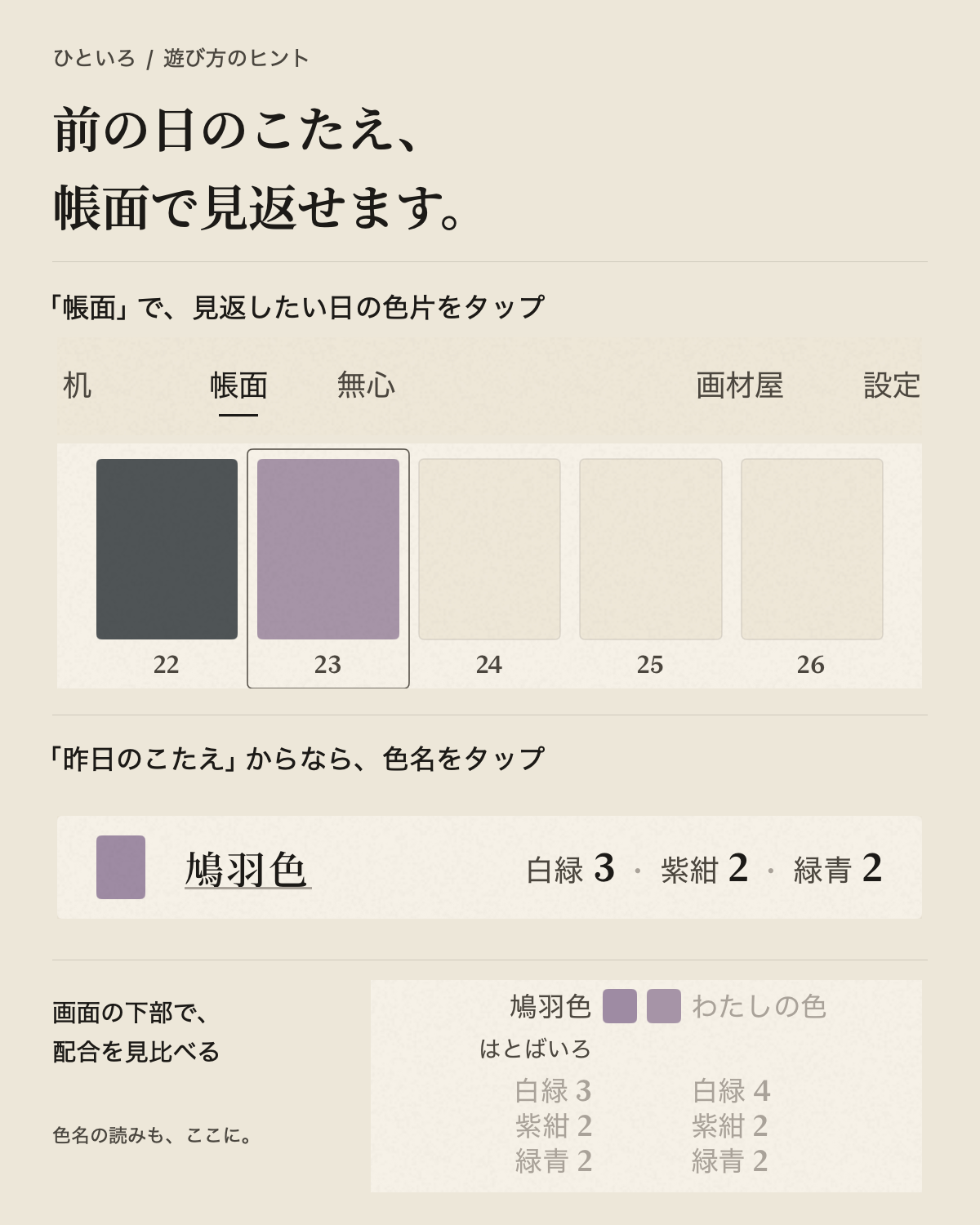
はい。上部メニューの「帳面」から、正解と自分の配合を見比べられます。
- 「帳面」で、見返したい月のページを開きます。
- その日の色片をタップすると、画面の下部に正解と自分の色・配合が並びます。色名の読みも、ここで確認できます。
机の「昨日のこたえ」を開き、下線のある色名をタップしても、その日の帳面へ移れます。
遊んだ日の正解は、翌日から見られます。机で「昨日のこたえ」を開いていなくても大丈夫。今日の分は明日のお楽しみで、遊ばなかった日は余白のままです。
Questions & answers
遊び方のヒントと、色づくりの小さな裏話。
はい。上部メニューの「帳面」から、正解と自分の配合を見比べられます。
机の「昨日のこたえ」を開き、下線のある色名をタップしても、その日の帳面へ移れます。
遊んだ日の正解は、翌日から見られます。机で「昨日のこたえ」を開いていなくても大丈夫。今日の分は明日のお楽しみで、遊ばなかった日は余白のままです。
半紙に塗る前なら、何度でも。「もう少しこの色を」と絵の具を足して、さらに混ぜられます。
最初からつくり直したいときは「皿を洗う」をどうぞ。見本と見比べながら、納得のいく色を探せます。
一致率が出るのは、最後のひと塗りのあと。一塗り・判定は一日一回で、塗ったあとのやり直しはできません。画材箱(Pro)でも、この回数は変わりません。
ひといろの100%は、色の数値が完全に同じという意味ではなく、お題にとても近い色になったことを表しています。
人の色の見え方に配慮した指標で近さを判定しているため、違う配合や、わずかに違う色でも100%になることがあります。並べて「少し色味が違うかも」と感じることもあります。
混ぜた色とお題の色を、OKLabという色空間で比較しています。一定の近さを満点とし、一致率は整数に丸めて表示します。RGBの各数値が一致したかどうかを調べているわけではありません。
皿では濡れた絵の具を、見本や共有画像では紙に塗って乾いた色を表現しています。
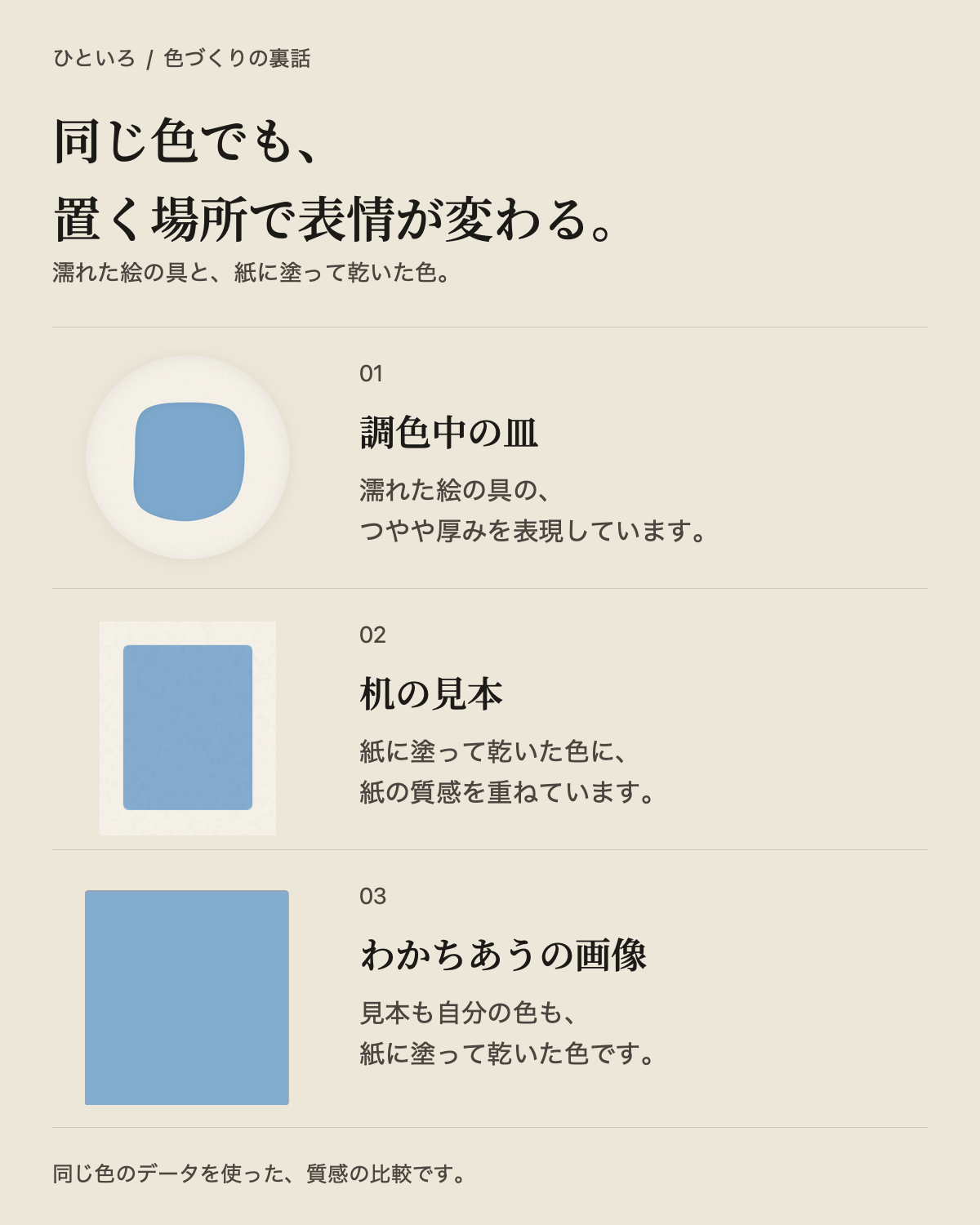
アプリ内の質感の違いとは、分けて考える必要があります。投稿先での画像処理や表示サイズ、見る画面などによっても、見え方は変わることがあります。
机でつくれるのは、今日の一色です。遊ばなかった日は帳面の余白として残り、過去の日をさかのぼって遊ぶことはできません。
一日の区切りは、iPhoneの現地の日付です。自由に色を混ぜたいときは、上部メニューの「無心」でも遊べます。
上部メニューの「設定」から「購入を復元」をお使いください。購入時と同じApple Accountと、インターネット接続が必要です。
色づくりや帳面はオフラインで楽しめます。価格の取得、購入、復元、コードの利用には通信が必要です。
ひといろの「設定」で朝の通知を有効にし、iPhoneの「設定」でも、ひといろの通知が許可されているか確認してください。
iPhoneの中に保存され、ウィジェットも同じ記録を参照します。開発者のサーバーへ送信することはありません。
困ったことや、気づいたことがあればお知らせください。端末の機種、iOSとひといろのバージョン、起きたことを添えていただくと確認が早くなります。
Apple Accountのパスワードや決済情報は送らないでください。
wktk.support@gmail.comEnglish
A little help with mixing, and a closer look at color.
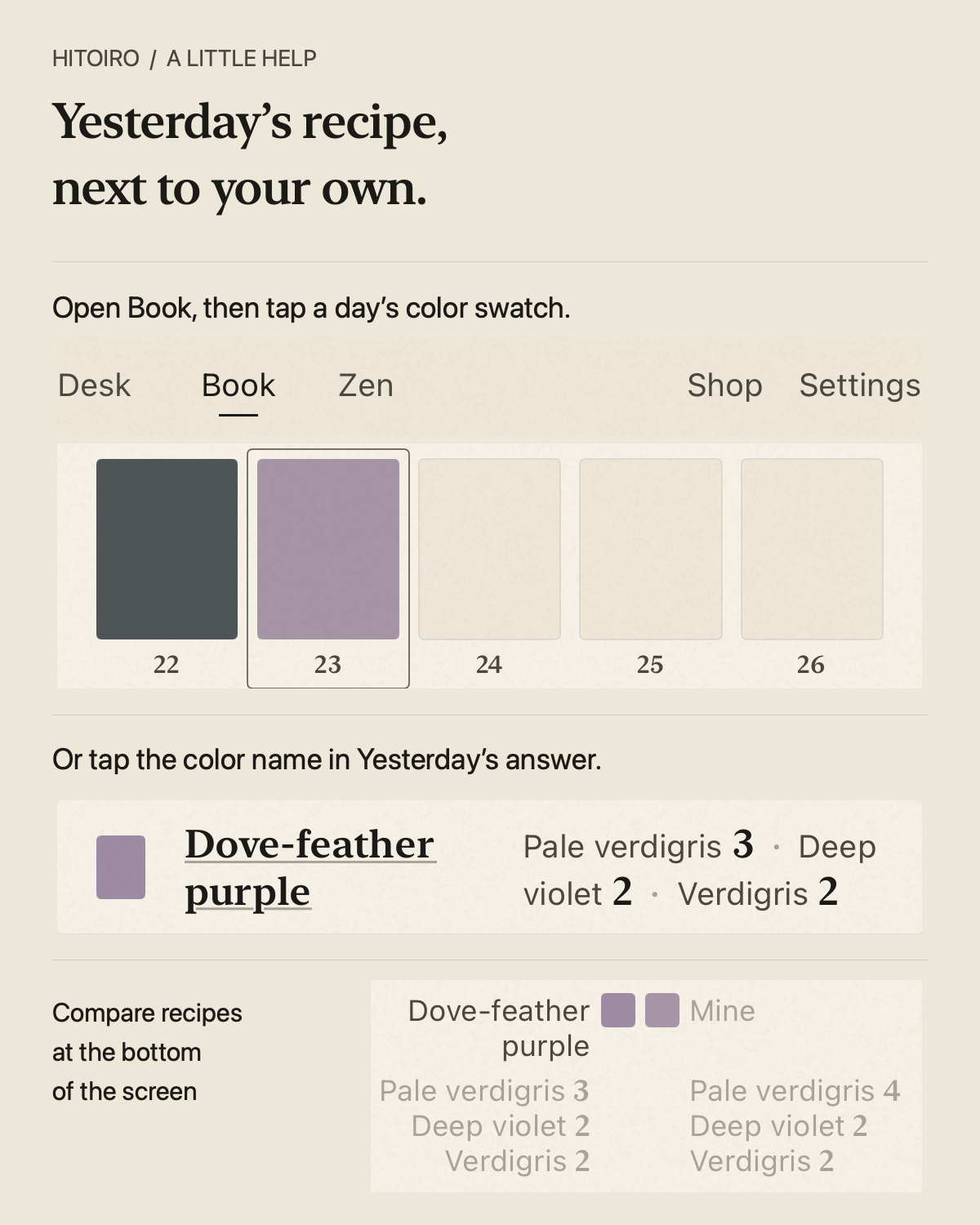
Yes. Open Book in the top menu to compare the suggested recipe with your own mix.
You can also open Yesterday's answer on the Desk and tap the underlined color name to go straight to that day in Book.
Recipes for days you've played are available from the following day, even if you didn't open Yesterday's answer on the Desk. Today's recipe waits until tomorrow, and days you didn't play stay blank.
As often as you like, before the final brushstroke. Add a little more pigment, then keep mixing to adjust your color.
To start fresh, tap Rinse the dish. You can compare each mix with the target by eye as you find a color you're happy with.
Your match percentage appears only after the final brushstroke. You get one brushstroke and result per day, with no retries after painting. The Paint Box (Pro) doesn't change this limit.
In Hitoiro, 100% means your color is very close to the target, not that its numerical values are identical.
We measure closeness using a color space designed around human perception. Different recipes, and slightly different colors, can earn 100%. Side by side, you might still notice a subtle difference in color.
We compare your mixed color with the target in a color space called OKLab. Colors within a small distance receive full marks, and the percentage is rounded to a whole number. We don't require every RGB value to be identical.
The dish shows wet paint, while the target and shared images show paint that has dried on paper.
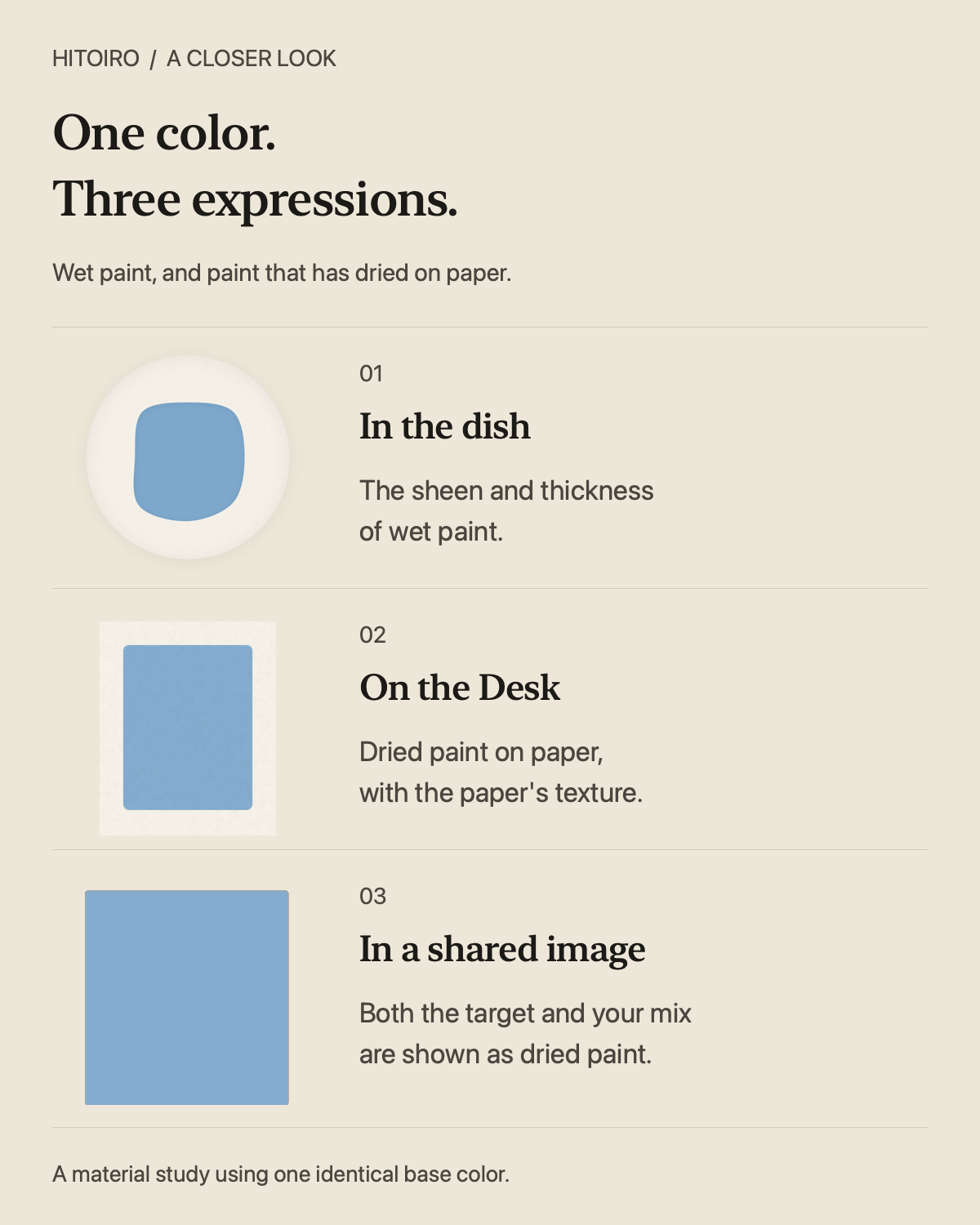
That's separate from Hitoiro's material effects. Image processing, display size, and the screen you're viewing can also affect how a posted image looks.
The Desk offers today's color. Days you didn't play remain as blank paper in your Book; past days can't be replayed.
Each day follows your iPhone's local calendar date. If you'd like to keep mixing freely, visit Zen in the top menu.
Open Settings in the top menu and choose Restore purchases. You'll need an internet connection and the Apple Account that made the purchase.
Color mixing and your Book work offline. A connection is needed for prices, purchases, restores, and redeeming codes.
Enable morning notifications in Hitoiro's Settings, and check that notifications for Hitoiro are also allowed in your iPhone's Settings.
On your iPhone. The widgets read those same records; they aren't sent to the developer's server.
Email us with your iPhone model, iOS version, Hitoiro version, and a short description of what happened. Questions and observations are welcome.
Never send your Apple Account password or payment-card details.
wktk.support@gmail.com